
These are the ramblings of Matthijs Kooijman, concerning the software he hacks on, hobbies he has and occasionally his personal life.
Most content on this site is licensed under the WTFPL, version 2 (details).
Questions? Praise? Blame? Feel free to contact me.
My old blog (pre-2006) is also still available.
See also my Mastodon page.
- Raspberry pi powerdown and powerup button (45)
- Repurposing the "Ecobutton" to skip spotify songs using Linux udev/hwdb key remapping (3)
- How to resize a cached LVM volume (with less work) (2)
- Reliable long-distance Arduino communication: RS485 & MODBUS? (6)
- USB, Thunderbolt, Displayport & docks (21)
| Sun | Mon | Tue | Wed | Thu | Fri | Sat |
|---|---|---|---|---|---|---|
| 1 | 2 | 3 | 4 | 5 | 6 | |
| 7 | 8 | 9 | 10 | 11 | 12 | 13 |
| 14 | 15 | 16 | 17 | 18 | 19 | 20 |
| 21 | 22 | 23 | 24 | 25 | 26 | 27 |
| 28 | 29 | 30 |
(...), Arduino, AVR, BaRef, Blosxom, Book, Busy, C++, Charity, Debian, Electronics, Examination, Firefox, Flash, Framework, FreeBSD, Gnome, Hardware, Inter-Actief, IRC, JTAG, LARP, Layout, Linux, Madness, Mail, Math, MS-1013, Mutt, Nerd, Notebook, Optimization, Personal, Plugins, Protocol, QEMU, Random, Rant, Repair, S270, Sailing, Samba, Sanquin, Script, Sleep, Software, SSH, Study, Supermicro, Symbols, Tika, Travel, Trivia, USB, Windows, Work, X201, Xanthe, XBee
 &
&
(With plugins: config, extensionless, hide, tagging, Markdown, macros, breadcrumbs, calendar, directorybrowse, feedback, flavourdir, include, interpolate_fancy, listplugins, menu, pagetype, preview, seemore, storynum, storytitle, writeback_recent, moreentries)
Valid XHTML 1.0 Strict & CSS
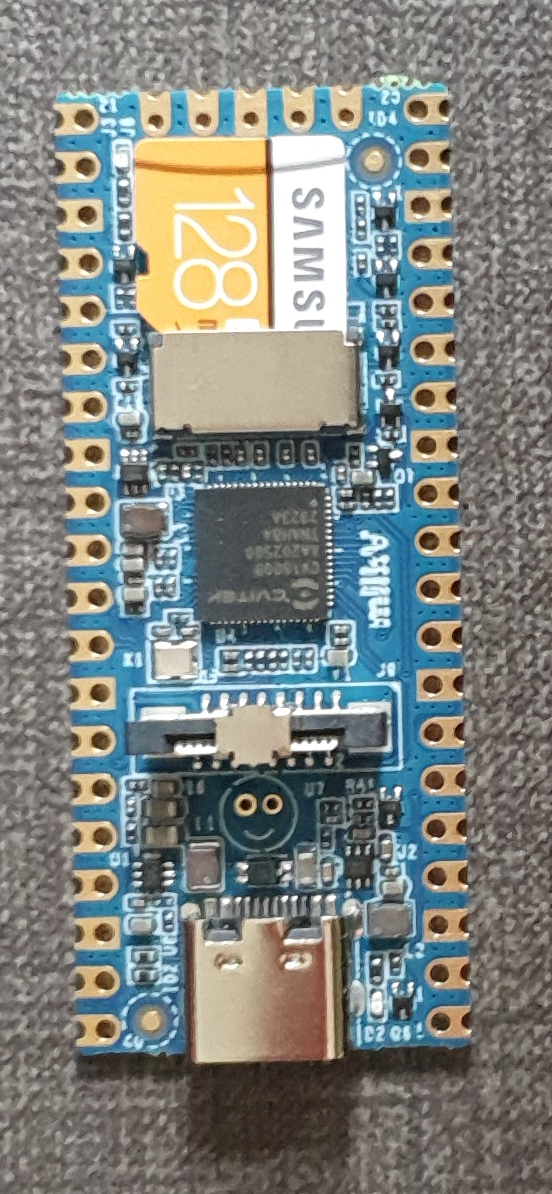
For a project (building a low-power LoRaWAN gateway to be solar powered) I am looking at simple and low-power linux boards. One board that I came across is the Milk-V Duo, which looks very promising. I have been playing around with it for just a few hours, and I like the board (and its SoC) very much already - for its size, price and open approach to documentation.
The board itself is a small (21x51mm) board in Raspberry Pi Pico form factor. It is very simple - essentially only a SoC and regulators. The SoC is the CV1800B by Sophgo, (a vendor I had never heard of until now, seems they were called CVITEK before). It is based on the RISC-V architecture, which is nice. It contains two RISC-V cores (one at 1Ghz and one at 700Mhz), as well as a small 8051 core for low-level tasks. The SoC has 64MB of integrated RAM.
The SoC supports the usual things - SPI, I²C, UART. There is also a CSI (camera) connector and some AI accelaration block, it seems the chip is targeted at the AI computer vision market (but I am ignoring that for my usecase). The SoC also has an ethernet controller and PHY integrated (but no ethernet connector, so you still need an external magjack to use it). My board has an SD card slot for booting, the specs suggest that there might also be a version that has on-board NAND flash instead of SD (cannot combine both, since they use the same pins).
There are two other variants - the Duo 256M with more RAM (board is identical except for 1 extra power supply, just uses a different SoC with more RAM) and the Duo S (in what looks like Rock Pi S form factor) which adds an ethernet and USB host port. I have not tested either of these and they use a different SoC series (SG200x) of the same chip vendor, so things I write might or might not be applicable to them (but the chips might actually be very similar internally, the CVx to SGx change seems to be related to the company merger, not necessarily technical differences).
The biggest (or at least most distinguishing) selling point, to me, is that both the chip and board manufacturers seem to be going for a very open approach. In particular:
On my server, I use LVM for managing partitions. I have one big "data" partition that is stored on an HDD, but for a bit more speed, I have an LVM cache volume linked to it, so commonly used data is cached on an SSD for faster read access.
Today, I wanted to resize the data volume:
# lvresize -L 300G tika/data
Unable to resize logical volumes of cache type.
Bummer. Googling for the error message showed me some helpful posts here and here that told me you have to remove the cache from the data volume, resize the data volume and then set up the cache again.
For this, they used lvconvert --uncache, which detaches and deletes
the cache volume or cache pool completely, so you then have to recreate
the entire cache (and thus figure out how you created it in the first
place).
Trying to understand my own work from long ago, I looked through
documentation and found the lvconvert --splitcache in
lvmcache(7), which detached a cache volume or cache pool,
but does not delete it. This means you can resize and just reattached
the cache again, which is a lot less work (and less error prone).
For an example, here is how the relevant volumes look:
# lvs -a
LV                VG   Attr       LSize   Pool              Origin       Data%  Meta%  Move Log Cpy%Sync Convert
data              tika Cwi-aoC--- 300.00g [data-cache_cvol] [data_corig] 2.77   13.11           0.00
[data-cache_cvol] tika Cwi-aoC---  20.00g
[data_corig]      tika owi-aoC--- 300.00g
Here, data is a "cache" type LV that ties together the big data_corig LV
that contains the bulk data and small data-cache_cvol that contains the
cached data.
After detaching the cache with --splitcache, this changes to:
# lvs -a
LV               VG   Attr       LSize   Pool Origin Data%  Meta%  Move Log Cpy%Sync Convert
data             tika -wi-ao---- 300.00g
data-cache       tika -wi-------  20.00g
I think the previous data cache LV was removed, data_corig was renamed to
data and data-cache_cvol was renamed to data-cache again.
The actual resize
Armed with this knowledge, here's how the ful resize works:
lvconvert --splitcache tika/data
lvresize -L 300G tika/data @hdd
lvconvert --type cache --cachevol tika/data-cache tika/data --cachemode writethrough
The last command might need some additional parameters depending on how you set
up the cache in the first place. You can view current cache parameters with
e.g. lvs -a -o +cache_mode,cache_settings,cache_policy.
Cache pools
Note that all of this assumes using a cache volume an not a cache pool. I was originally using a cache pool setup, but it seems that a cache pool (which splits cache data and cache metadata into different volumes) is mostly useful if you want to split data and metadata over different PV's, which is not at all useful for me. So I switched to the cache volume approach, which needs fewer commands and volumes to set up.
I killed my cache pool setup with --uncache before I found out about
--splitcache, so I did not actually try --splitcache with a cache pool, but
I think the procedure is actually pretty much identical as described above,
except that you need to replace --cachevol with --cachepool in the last
command.
For reference, here's what my volumes looked like when I was still using a cache pool:
# lvs -a
LV                 VG   Attr       LSize   Pool         Origin       Data%  Meta%  Move Log Cpy%Sync Convert
data               tika Cwi-aoC--- 260.00g [data-cache] [data_corig] 99.99  19.39           0.00
[data-cache]       tika Cwi---C---  20.00g                           99.99  19.39           0.00
[data-cache_cdata] tika Cwi-ao----  20.00g
[data-cache_cmeta] tika ewi-ao----  20.00m
[data_corig]       tika owi-aoC--- 260.00g
This is a data volume of type cache, that ties together the big data_corig
LV that contains the bulk data and a data-cache LV of type cache-pool that
ties together the data-cache_cdata LV with the actual cache data and
data-cache_cmeta with the cache metadata.
A few months ago, I put up an old Atom-powered Supermicro server (SYS-5015A-PHF) again, to serve at De War to collect and display various sensor and energy data about our building.
The server turned out to have an annoying habit: every now and then it would start beeping (one continuous annoying beep), that would continue until the machine was rebooted. It happened sporadically, but kept coming back. When I used this machine before, it was located in a datacenter where nobody would care about a beep more or less (so maybe it has been beeping for years on end before I replaced the server), but now it was in a server cabinet inside our local Fablab, where there are plenty of people to become annoyed by a beeping server...
I eventually traced this back to faulty sensor readings and fixed this by disabling the faulty sensors completely in the server's IPMI unit, which will hopefully prevent the annoying beep. In this post, I'll share my steps, in case anyone needs to do the same.

When sorting out some stuff today I came across an "Ecobutton". When you attach it through USB to your computer and press the button, your computer goes to sleep (at least that is the intention).
The idea is that it makes things more sustainable because you can more easily put your computer to sleep when you walk away from it. As this tweakers poster (Dutch) eloquently argues, having more plastic and electronics produced in China, shipped to Europe and sold here for €18 or so probably does not have a net positive effect on the environment or your wallet, but well, given this button found its way to me, I might as well see if I can make it do something useful.
I had previously started a project to make a "Next" button for spotify that you could carry around and would (wirelessly - with an ESP8266 inside) skip to the next song using the Spotify API whenever you pressed it. I had a basic prototype working, but then the project got stalled on figuring out an enclosure and finding sufficiently low-power addressable RGB LEDs (documentation about this is lacking, so I resorted to testing two dozen different types of LEDs and creating a website to collect specs and test results for adressable LEDs, which then ended up with the big collection of other Yak-shaving projects waiting for this magical moment where I suddenly have a lot of free time).
In any case, it seemed interesting to see if this Ecobutton could be used as poor-man's spotify next button. Not super useful, but at least now I can keep the button around knowing I can actually use it for something in the future. I also produced some useful (and not readily available) documentation about remapping keys with hwdb in the process, so it was at least not a complete waste of time... Anyway, into the technical details...
Recently, a customer asked me te have a look at an external hard disk he was using with his Macbook. It would show up a file listing just fine, but when trying to open actual files, it would start failing. Of course there was no backup, but the files were very precious...
This started out as a small question, but ended up in an adventure that spanned a few days and took me deep into the ddrescue recovery tool, through the HFS+ filesystem and past USB power port control. I learned a lot, discovered some interesting things and produced a pile of scripts that might be helpful to others. Since the journey seems interesting as well as the end result, I will describe the steps I took here, "ter leering ende vermaeck".
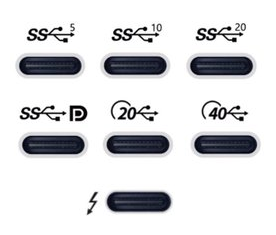
After I recently ordered a new laptop, I have been looking for a USB-C-connected dock to be used with my new laptop. This turned out to be quite complex, given there are really a lot of different bits of technology that can be involved, with various (continuously changing, yes I'm looking at you, USB!) marketing names to further confuse things.
As I'm prone to do, rather than just picking something and seeing if it works, I dug in to figure out how things really work and interact. I learned a ton of stuff in a short time, so I really needed to write this stuff down, both for my own sanity and future self, as well as for others to benefit.
I originally posted my notes on the Framework community forum, but it seemed more appropriate to publish them on my own blog eventually (also because there's no 32,000 character limit here :-p).
There are still quite a few assumptions or unknowns below, so if you have any confirmations, corrections or additions, please let me know in a reply (either here, or in the Framework community forum topic).
Parts of this post are based on info and suggestions provided by others on the Framework community forum, so many thanks to them!
Getting started
First off, I can recommend this article with a bit of overview and history of the involved USB and Thunderbolt technolgies.
Then, if you're looking for a dock, like I was, the Framework community forum has a good list of docks (focused on Framework operability), and Dan S. Charlton published an overview of Thunderbolt 4 docks and an overview of USB-C DP-altmode docks (both posts with important specs summarized, and occasional updates too).
Then, into the details...

For a while, I've been considering replacing Grubby, my trusty workhorse laptop, a Thinkpad X201 that I've been using for the past 11 years. These thinkpads are known to last, and indeed mine still worked nicely, but over the years lost Bluetooth functionality, speaker output, one of its USB ports (I literally lost part of the connector), some small bits of the casing (dropped something heavy on it), the fan sometimes made a grinding noise, and it was getting a little slow at times (but still fine for work). I had been postponing getting a replacement, though, since having to figure out what to get, comparing models, reading reviews is always a hassle (especially for me...).
Then, when I first saw the Framework laptop last year, I was immediately sold. It's a laptop that aims to be modular, in the sense that it can be easily repaired and upgraded. To be honest, this did not seem all that special to me at first, but apparently in the 11 years since I last bought a laptop, manufacturers have been more using glue rather than screws, and solder rather than sockets, which is a trend that Framework hopes to turn.
In addition to the modularity, I like the fact they make repairability and upgradability an explicit goal, in attempt to make the electronics ecosystem more sustainable (they remind me of Fairphone in that sense). On top of that, it seems that this is also a really well made laptop, with a lot of attention to details, explicit support for Linux, open-source where possible (e.g. code for the embedded controller is open, ), flexible expansion ports using replacable modules, encouraging third parties to build and market their own expansion cards and addons (with open-source reference designs available), a mainboard that can be used standalone too (makes for a nice SBC after a mainboard upgrade), decent keyboard, etc.
The only things that I'm less enthusiastic about are the reflective screen (I had that on my previous laptop and I remember liking the switch to a matte screen, but I guess I'll get used to that), having just four expansion ports (the only fixed port is an audio jack, everything else - USB, displays, card reader - has to go through expansion modules, so we'll see if I can get by with four ports) and the lack of an ethernet port (apparently there is an ethernet expansion module in the works, but I'll probably have to get a USB-to-ethernet module in the meanwhile).
Unfortunately, when I found the Framework laptop a few months ago, they were not actually being sold yet, though they expected to open up pre-orders in December. I really hoped Grubby would last long enough so I could get a Framework laptop. Then pre-orders opened only for US and Canada, with shipping to the EU announced for Q1 this year. Then they opened up orders for Germany, France and the UK, and I still had to wait...
So when they opened up pre-orders in the Netherlands last month, I immediately placed my order. They are using a batched shipping system and my batch is supposed to ship "in March" (part of the batch has already been shipped), so I'm hoping to get the new laptop somewhere it the coming weeks.
I suspect that Grubby took notice, because last friday, with a small sputter, he powered off unexpectedly and has refused to power back on. I've tried some CPR, but no luck so far, so I'm afraid it's the end for Grubby. I'm happy that I already got my Framework order in, since now I just borrowed another laptop as a temporary solution rather than having to panic and buy something else instead.
So, I'm eager for my Framework laptop to be delivered. Now, I just need to pick a new name, and figure out which Thunderbolt dock I want... (I had an old-skool docking station for my Thinkpad, which worked great, but with USB-C and Thunderbolt's single cable for power, display, usb and ethernet, there is now a lot more choice in docks, but more on that in my next post...).

Recently, I've been working with STM32 chips for a few different projects and customers. These chips are quite flexible in their pin assignments, usually most peripherals (i.e. an SPI or UART block) can be mapped onto two or often even more pins. This gives great flexibility (both during board design for single-purpose boards and later for a more general purpose board), but also makes it harder to decide and document the pinout of a design.
ST offers STM32CubeMX, a software tool that helps designing around an STM32 MCU, including deciding on pinouts, and generating relevant code for the system as well. It is probably a powerful tool, but it is a bit heavy to install and AFAICS does not really support general purpose boards (where you would choose between different supported pinouts at runtime or compiletime) well.
So in the past, I've used a trusted tool to support this process: A spreadsheet that lists all pins and all their supported functions, where you can easily annotate each pin with all the data you want and use colors and formatting to mark functions as needed to create some structure in the complexity.
However, generating such a pinout spreadsheet wasn't particularly easy. The tables from the datasheet cannot be easily copy-pasted (and the datasheet has the alternate and additional functions in two separate tables), and the STM32CubeMX software can only seem to export a pinout table with alternate functions, not additional functions. So we previously ended up using the CubeMX-generated table and then adding the additional functions manually, which is annoying and error-prone.
So I dug around in the CubeMX data files a bit, and found that it has an XML file for each STM32 chip that lists all pins with all their functions (both alternate and additional). So I wrote a quick Python script that parses such an XML file and generates a CSV script. The script just needs Python3 and has no additional dependencies.
To run this script, you will need the XML file for the MCU you are interested in from inside the CubeMX installation. Currently, these only seem to be distributed by ST as part of CubeMX. I did find one third-party github repo with the same data, but that wasn't updated in nearly two years). However, once you generate the pin listing and publish it (e.g. in a spreadsheet), others can of course work with it without needing CubeMX or this script anymore.
For example, you can run this script as follows:
$ ./stm32pinout.py /usr/local/cubemx/db/mcu/STM32F103CBUx.xml
name,pin,type
VBAT,1,Power
PC13-TAMPER-RTC,2,I/O,GPIO,EXTI,EVENTOUT,RTC_OUT,RTC_TAMPER
PC14-OSC32_IN,3,I/O,GPIO,EXTI,EVENTOUT,RCC_OSC32_IN
PC15-OSC32_OUT,4,I/O,GPIO,EXTI,ADC1_EXTI15,ADC2_EXTI15,EVENTOUT,RCC_OSC32_OUT
PD0-OSC_IN,5,I/O,GPIO,EXTI,RCC_OSC_IN
(... more output truncated ...)
The script is not perfect yet (it does not tell you which functions correspond to which AF numbers and the ordering of functions could be improved, see TODO comments in the code), but it gets the basic job done well.
You can find the script in my "scripts" repository on github.
Update: It seems the XML files are now also available separately on github: https://github.com/STMicroelectronics/STM32_open_pin_data, and some of the TODOs in my script might be solvable.
For this blog, I wanted to include some nicely-formatted formulas. An easy way to do so, is to use MathJax, a javascript-based math processor where you can write formulas using (among others) the often-used Tex math syntax.
However, I use Markdown to write my blogposts and including formulas directly in the text can be problematic because Markdown might interpret part of my math expressions as Markdown and transform them before MathJax has had a chance to look at them. In this post, I present a customized MathJax configuration that solves this problem in a reasonable elegant way.
Every now and then I work on some complex C++ code (mostly stuff running on Arduino nowadays) so I can write up some code in a nice, consise and abstracted manner. This almost always involves classes, constructors and templates, which serve their purpose in the abstraction, but once you actually call them, the compiler should optimize all of them away as much as possible.
This usually works nicely, but there was one thing that kept bugging me. No matter how simple your constructors are, initializing using constructors always results in some code running at runtime.
In contrast, when you initialize normal integer variable, or a struct variable using aggregate initialization, the copmiler can completely do the initialization at compiletime. e.g. this code:
struct Foo {uint8_t a; bool b; uint16_t c};
Foo x = {0x12, false, 0x3456};
Would result in four bytes (0x12, 0x00, 0x34, 0x56, assuming no padding and big-endian) in the data section of the resulting object file. This data section is loaded into memory using a simple loop, which is about as efficient as things get.
Now, if I write the above code using a constructor:
struct Foo {
    uint8_t a; bool b; uint16_t c;};
    Foo(uint8_t a, bool b, uint16_t c) : a(a), b(b), c(c) {}
};
Foo x = Foo(0x12, false, 0x3456);
This will result in those four bytes being allocated in the bss section (which is zero-initialized), with the constructor code being executed at startup. The actual call to the constructor is inlined of course, but this still means there is code that loads every byte into a register, loads the address in a register, and stores the byte to memory (assuming an 8-bit architecture, other architectures will do more bytes at at time).
This doesn't matter much if it's just a few bytes, but for larger objects, or multiple small objects, having the loading code intermixed with the data like this easily requires 3 to 4 times as much code as having it loaded from the data section. I don't think CPU time will be much different (though first zeroing memory and then loading actual data is probably slower), but on embedded systems like Arduino, code size is often limited, so not having the compiler just resolve this at compiletime has always frustrated me.
Constant Initialization
Today I learned about a new feature in C++11: Constant initialization. This means that any global variables that are initialized to a constant expression, will be resolved at runtime and initialized before any (user) code (including constructors) starts to actually run.
A constant expression is essentially an expression that the compiler can
guarantee can be evaluated at compiletime. They are required for e.g array
sizes and non-type template parameters. Originally, constant expressions
included just simple (arithmetic) expressions, but since C++11 you can
also use functions and even constructors as part of a constant
expression. For this, you mark a function using the constexpr keyword,
which essentially means that if all parameters to the function are
compiletime constants, the result of the function will also be
(additionally, there are some limitations on what a constexpr function
can do).
So essentially, this means that if you add constexpr to all
constructors and functions involved in the initialization of a variable,
the compiler will evaluate them all at compiletime.
(On a related note - I'm not sure why the compiler doesn't deduce
constexpr automatically. If it can verify if it's allowed to use
constexpr, why not add it? Might be too resource-intensive perhaps?)
Note that constant initialization does not mean the variable has to be
declared const (e.g. immutable) - it's just that the initial value
has to be a constant expression (which are really different concepts -
it's perfectly possible for a const variable to have a non-constant
expression as its value. This means that the value is set by normal
constructor calls or whatnot at runtime, possibly with side-effects,
without allowing any further changes to the value after that).
Enforcing constant initialization?
Anyway, so much for the introduction of this post, which turned out longer than I planned :-). I learned about this feature from this great post by Andrzej Krzemieński. He also writes that it is not really possible to enforce that a variable is constant-initialized:
It is difficult to assert that the initialization of globals really took place at compile-time. You can inspect the binary, but it only gives you the guarantee for this binary and is not a guarantee for the program, in case you target for multiple platforms, or use various compilation modes (like debug and retail). The compiler may not help you with that. There is no way (no syntax) to require a verification by the compiler that a given global is const-initialized.
If you accidentially forget constexpr on one function involved, or some other requirement is not fulfilled, the compiler will happily fall back to less efficient runtime initialization instead of notifying you so you can fix this.
This smelled like a challenge, so I set out to investigate if I could
figure out some way to implement this anyway. I thought of using a
non-type template argument (which are required to be constant
expressions by C++), but those only allow a limited set of types to be
passed. I tried using builtin_constant_p, a non-standard gcc
construct, but that doesn't seem to recognize class-typed constant
expressions.
Using static_assert
It seems that using the (also introduced in C++11) static_assert
statement is a reasonable (though not perfect) option. The first
argument to static_assert is a boolean that must be a constant
expression. So, if we pass it an expression that is not a constant
expression, it triggers an error. For testing, I'm using this code:
class Foo {
public:
  constexpr Foo(int x) { }
  Foo(long x) { }
};

Foo a = Foo(1);
Foo b = Foo(1L);
We define a Foo class, which has two constructors: one accepts an
int and is constexpr and one accepts a long and is not
constexpr. Above, this means that a will be const-initialized, while
b is not.
To use static_assert, we cannot just pass a or b as the condition,
since the condition must return a bool type. Using the comma operator
helps here (the comma accepts two operands, evaluates both and then
discards the first to return the second):
static_assert((a, true), "a not const-initialized"); // OK
static_assert((b, true), "b not const-initialized"); // OK :-(
However, this doesn't quite work, neither of these result in an error. I
was actually surprised here - I would have expected them both to fail,
since neither a nor b is a constant expression. In any case, this
doesn't work. What we can do, is simply copy the initializer used for
both into the static_assert:
static_assert((Foo(1), true), "a not const-initialized"); // OK
static_assert((Foo(1L), true), "b not const-initialized"); // Error
This works as expected: The int version is ok, the long version
throws an error. It doesn't trigger the assertion, but
recent gcc versions show the line with the error, so it's good enough:
test.cpp:14:1: error: non-constant condition for static assertion
 static_assert((Foo(1L), true), "b not const-initialized"); // Error
 ^
test.cpp:14:1: error: call to non-constexpr function ‘Foo::Foo(long int)’
This isn't very pretty though - the comma operator doesn't make it very clear what we're doing here. Better is to use a simple inline function, to effectively do the same:
template <typename T>
constexpr bool ensure_const_init(T t) { return true; }

static_assert(ensure_const_init(Foo(1)), "a not const-initialized"); // OK
static_assert(ensure_const_init(Foo(1L)), "b not const-initialized"); // Error
This achieves the same result, but looks nicer (though the
ensure_const_init function does not actually enforce anything, it's
the context in which it's used, but that's a matter of documentation).
Note that I'm not sure if this will actually catch all cases, I'm not
entirely sure if the stuff involved with passing an expression to
static_assert (optionally through the ensure_const_init function) is
exactly the same stuff that's involved with initializing a variable with
that expression (e.g. similar to the copy constructor issue below).
The function itself isn't perfect either - It doesn't handle (const) (rvalue) references so I believe it might not work in all cases, so that might need some fixing.
Also, having to duplicate the initializer in the assert statement is a big downside - If I now change the variable initializer, but forget to update the assert statement, all bets are off...
Using constexpr constant
As Andrzej pointed out in his post, you can mark variables with
constexpr, which requires them to be constant initialized. However,
this also makes the variable const, meaning it cannot be changed after
initialization, which we do not want. However, we can still leverage this
using a two-step initialization:
constexpr Foo c_init = Foo(1); // OK
Foo c = c_init;

constexpr Foo d_init = Foo(1L); // Error
Foo d = d_init;
This isn't very pretty either, but at least the initializer is only defined once. This does introduce an extra copy of the object. With the default (implicit) copy constructor this copy will be optimized out and constant initialization still happens as expected, so no problem there.
However, with user-defined copy constructors, things are diffrent:
class Foo2 {
public:
  constexpr Foo2(int x) { }
  Foo2(long x) { }
  Foo2(const Foo2&) { }
};

constexpr Foo2 e_init = Foo2(1); // OK
Foo2 e = e_init; // Not constant initialized but no error!
Here, a user-defined copy constructor is present that is not declared
with constexpr. This results in e being not constant-initialized,
even though e_init is (this is actually slighly weird - I would expect
the initialization syntax I used to also call the copy constructor when
initializing e_init, but perhaps that one is optimized out by gcc in
an even earlier stage).
We can user our earlier ensure_const_init function here:
constexpr Foo f_init = Foo(1);
Foo f = f_init;
static_assert(ensure_const_init(f_init), "f not const-initialized"); // OK

constexpr Foo2 g_init = Foo2(1);
Foo2 g = g_init;
static_assert(ensure_const_init(g_init), "g not const-initialized"); // Error
This code is actually a bit silly - of course f_init and g_init are
const-initialized, they are declared constexpr. I initially tried this
separate init variable approach before I realized I could (need to,
actually) add constexpr to the init variables. However, this silly
code does catch our problem with the copy constructor. This is just a
side effect of the fact that the copy constructor is called when the
init variables are passed to the ensure_const_init function.
Using two variables
One variant of the above would be to simply define two objects: the one you want, and an identical constexpr version:
Foo h = Foo(1);
constexpr Foo h_const = Foo(1);
It should be reasonable to assume that if h_const can be
const-initialized, and h uses the same constructor and arguments, that
h will be const-initialized as well (though again, no real guarantee).
This assumes that the h_const object, being unused, will be optimized
away. Since it is constexpr, we can also be sure that there are no
constructor side effects that will linger, so at worst this wastes a bit
of memory if the compiler does not optimize it.
Again, this requires duplication of the constructor arguments, which can be error-prone.
Summary
There's two significant problems left:
None of these approaches actually guarantee that const-initialization happens. It seems they catch the most common problem: Having a non-
constexprfunction or constructor involved, but inside the C++ minefield that is (copy) constructors, implicit conversions, half a dozen of initialization methods, etc., I'm pretty confident that there are other caveats we're missing here.None of these approaches are very pretty. Ideally, you'd just write something like:
constinit Foo f = Foo(1);or, slightly worse:
Foo f = constinit(Foo(1));
Implementing the second syntax seems to be impossible using a function -
function parameters cannot be used in a constant expression (they could
be non-const). You can't mark parameters as constexpr either.
I considered to use a preprocessor macro to implement this. A macro
can easily take care of duplicating the initialization value (and since
we're enforcing constant initialization, there's no side effects to
worry about). It's tricky, though, since you can't just put a
static_assert statement, or additional constexpr variable
declaration inside a variable initialization. I considered using a
C++11 lambda expression for that, but those can only contain a
single return statement and nothing else (unless they return void) and
cannot be declared constexpr...
Perhaps a macro that completely generates the variable declaration and
initialization could work, but still a single macro that generates
multiple statement is messy (and the usual do {...} while(0) approach
doesn't work in global scope. It's also not very nice...
Any other suggestions?
Update 2020-11-06: It seems that C++20 has introduced a new
keyword, constinit to do exactly this: Require that at variable is
constant-initialized, without also making it const like constexpr
does. See https://en.cppreference.com/w/cpp/language/constinit